
Other Services
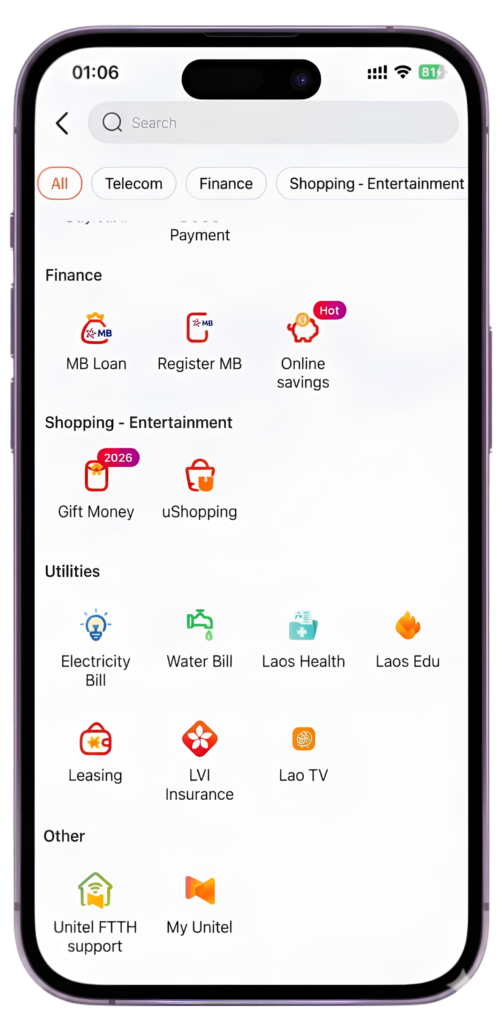
In addition to its main services of money transfer, withdrawal, and deposit, Umoney also offers many other services such as paying for Lao Airline tickets, Split Bill, paying for Loca taxi fares, Visa, and purchasing Speakers.
SECURE & RELIABLE TRANSACTIONS
Umoney guarantees total protection for users transactions


Register and Top up right now SUPER EASY
Access hundreds of features with free payments. Conduct transactions, make payments, and transfer funds conveniently anytime, anywhere.
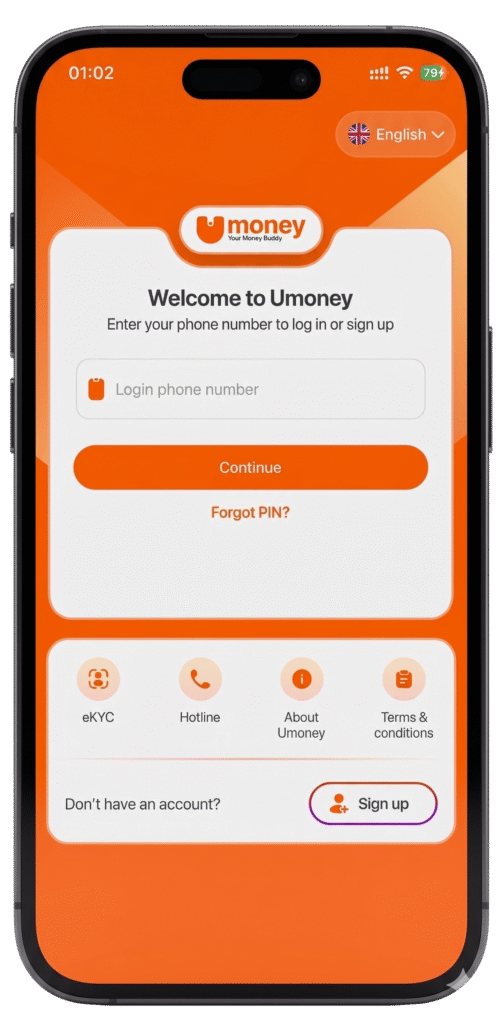
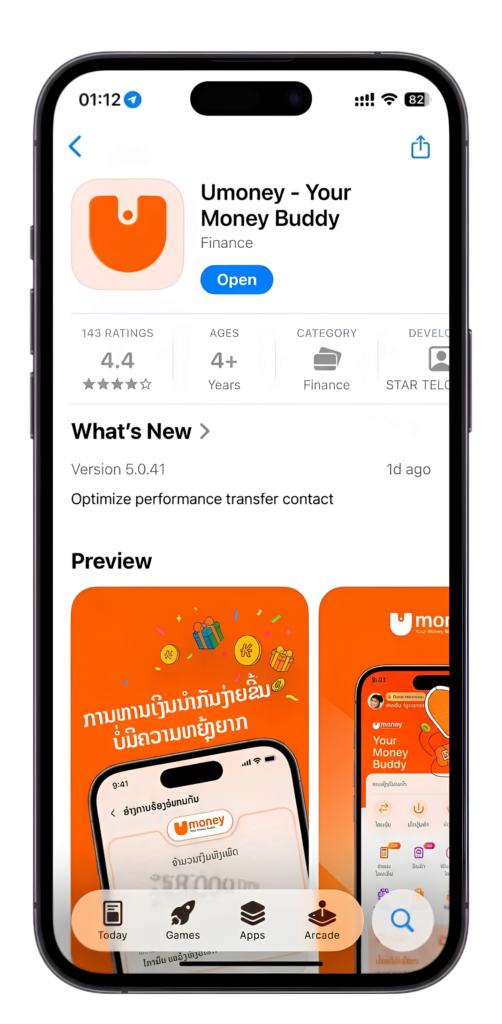
- Download Umoney
- Search Umoney on App Store or CH Play and install free
- Enter your phone number and verify the OTP sent via SMS
- On the Home screen, select “Profile” and then “Profile”
- Follow the instructions – Complete your registration
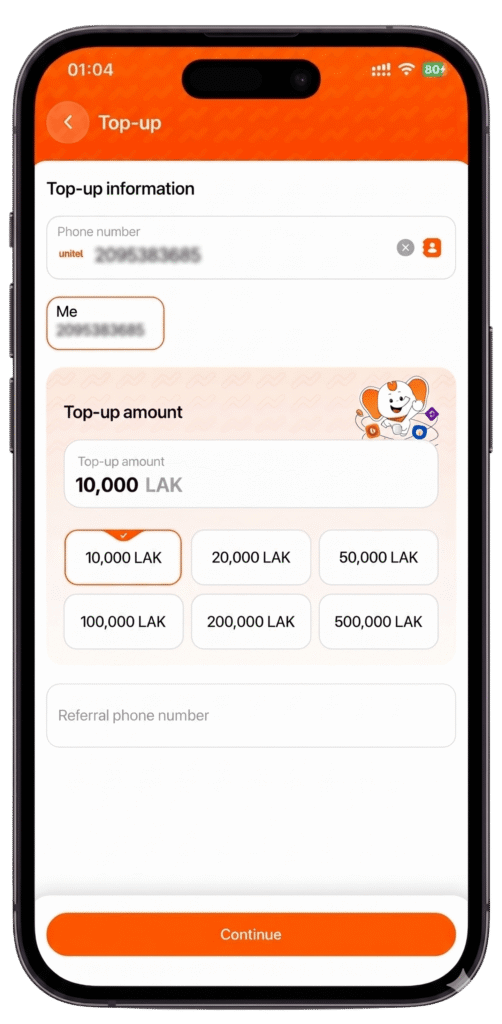
- Top up easily via bank transfer or at Umoney & Unitel agent
- In Home screen, select “Cash in”, then select “Cash in at bank” for bank account or “Cash in at POS” for direct Umoney/Unitel Agent
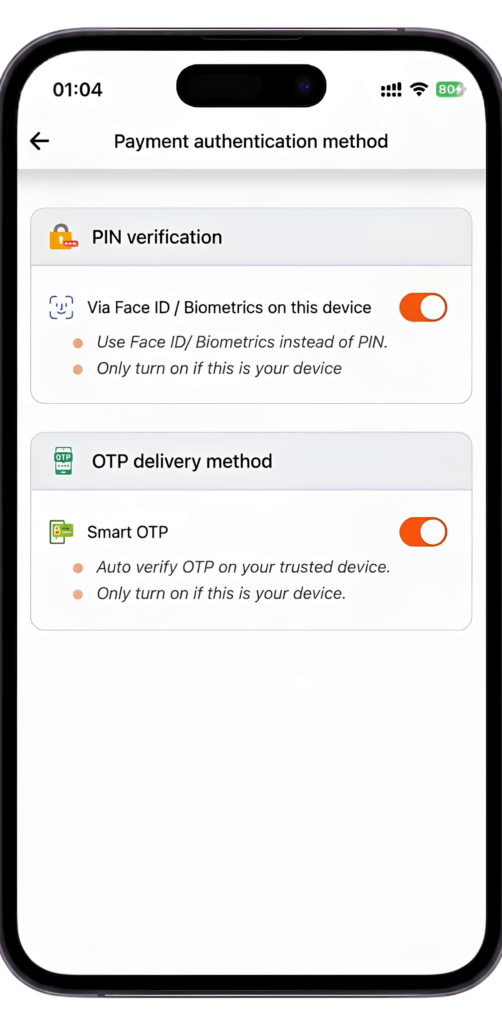
- Set up Face ID or Fingerprint Authentication
- From your “Profile”, tap “Settings” and select “Payment Authentication Method”. Set up Face ID or Fingerprint recognition for a fast and seamless login next time.
- Receive messages in 1 second
- Receive your verification code in just 1 second via SMS.
- Instant Money Transfer
- Execute immediate interbank transfers with zero fees – Available 24/7
- Auto-Earning with Umoney
- Simply maintain a balance over 500,000 Kip and use any service to receive monthly interest
- Pay School Fees Instantly with Your Umoney
- Every payment made simple with Umoney
- Seamless Payments
- Pay anytime, anywhere with Umoney
- Home Service Special Offers
- Enjoy massive rewards on home services including FTTH, electricity, and water bill payments
- Download Umoney on App Store & Google Play
- Download Umoney now for ultimate convenience and more promotions
- Register & Verify Your Account
- Complete your KYC today to instantly receive 10,000 KIP and many other valuable rewards
EXPRIENCE AN EASY AND CONVENIENT LIFE WITH UMONEY
Download Umoney for free now


Transfer Money
Send and receive funds instantly between Umoney wallets or transfer to over 16 major banks via the national LAPNet system anytime, anywhere with multi-layer security.
SECURE & RELIABLE TRANSACTIONS
Umoney guarantees total protection for users transactions
Register and Top up right now SUPER EASY
Access hundreds of features with free payments. Conduct transactions, make payments, and transfer funds conveniently anytime, anywhere.
- Download Umoney
- Search Umoney on App Store or CH Play and install free
- Enter your phone number and verify the OTP sent via SMS
- On the Home screen, select “Profile” and then “Profile”
- Follow the instructions – Complete your registration
- Top up easily via bank transfer or at Umoney & Unitel agent
- In Home screen, select “Cash in”, then select “Cash in at bank” for bank account or “Cash in at POS” for direct Umoney/Unitel Agent
- Set up Face ID or Fingerprint Authentication
- From your “Profile”, tap “Settings” and select “Payment Authentication Method”. Set up Face ID or Fingerprint recognition for a fast and seamless login next time.
- Receive messages in 1 second
- Receive your verification code in just 1 second via SMS.
- Instant Money Transfer
- Execute immediate interbank transfers with zero fees – Available 24/7
- Auto-Earning with Umoney
- Simply maintain a balance over 500,000 Kip and use any service to receive monthly interest
- Pay School Fees Instantly with Your Umoney
- Every payment made simple with Umoney
- Seamless Payments
- Pay anytime, anywhere with Umoney
- Home Service Special Offers
- Enjoy massive rewards on home services including FTTH, electricity, and water bill payments
- Download Umoney on App Store & Google Play
- Download Umoney now for ultimate convenience and more promotions
- Register & Verify Your Account
- Complete your KYC today to instantly receive 10,000 KIP and many other valuable rewards
EXPRIENCE AN EASY AND CONVENIENT LIFE WITH UMONEY
Download Umoney for free now
Cash In
Top up your account balance quickly by linking your bank card or visiting any of the 80,000+ Umoney agents and Unitel service points nationwide.
SECURE & RELIABLE TRANSACTIONS
Umoney guarantees total protection for users transactions
Register and Top up right now SUPER EASY
Access hundreds of features with free payments. Conduct transactions, make payments, and transfer funds conveniently anytime, anywhere.
- Download Umoney
- Search Umoney on App Store or CH Play and install free
- Enter your phone number and verify the OTP sent via SMS
- On the Home screen, select “Profile” and then “Profile”
- Follow the instructions – Complete your registration
- Top up easily via bank transfer or at Umoney & Unitel agent
- In Home screen, select “Cash in”, then select “Cash in at bank” for bank account or “Cash in at POS” for direct Umoney/Unitel Agent
- Set up Face ID or Fingerprint Authentication
- From your “Profile”, tap “Settings” and select “Payment Authentication Method”. Set up Face ID or Fingerprint recognition for a fast and seamless login next time.
- Receive messages in 1 second
- Receive your verification code in just 1 second via SMS.
- Instant Money Transfer
- Execute immediate interbank transfers with zero fees – Available 24/7
- Auto-Earning with Umoney
- Simply maintain a balance over 500,000 Kip and use any service to receive monthly interest
- Pay School Fees Instantly with Your Umoney
- Every payment made simple with Umoney
- Seamless Payments
- Pay anytime, anywhere with Umoney
- Home Service Special Offers
- Enjoy massive rewards on home services including FTTH, electricity, and water bill payments
- Download Umoney on App Store & Google Play
- Download Umoney now for ultimate convenience and more promotions
- Register & Verify Your Account
- Complete your KYC today to instantly receive 10,000 KIP and many other valuable rewards
EXPRIENCE AN EASY AND CONVENIENT LIFE WITH UMONEY
Download Umoney for free now
Cash Out
Convert your digital balance into physical cash seamlessly at over 80,000 agents or directly at the counters of partner banks across all 18 provinces.
SECURE & RELIABLE TRANSACTIONS
Umoney guarantees total protection for users transactions
Register and Top up right now SUPER EASY
Access hundreds of features with free payments. Conduct transactions, make payments, and transfer funds conveniently anytime, anywhere.
- Download Umoney
- Search Umoney on App Store or CH Play and install free
- Enter your phone number and verify the OTP sent via SMS
- On the Home screen, select “Profile” and then “Profile”
- Follow the instructions – Complete your registration
- Top up easily via bank transfer or at Umoney & Unitel agent
- In Home screen, select “Cash in”, then select “Cash in at bank” for bank account or “Cash in at POS” for direct Umoney/Unitel Agent
- Set up Face ID or Fingerprint Authentication
- From your “Profile”, tap “Settings” and select “Payment Authentication Method”. Set up Face ID or Fingerprint recognition for a fast and seamless login next time.
- Receive messages in 1 second
- Receive your verification code in just 1 second via SMS.
- Instant Money Transfer
- Execute immediate interbank transfers with zero fees – Available 24/7
- Auto-Earning with Umoney
- Simply maintain a balance over 500,000 Kip and use any service to receive monthly interest
- Pay School Fees Instantly with Your Umoney
- Every payment made simple with Umoney
- Seamless Payments
- Pay anytime, anywhere with Umoney
- Home Service Special Offers
- Enjoy massive rewards on home services including FTTH, electricity, and water bill payments
- Download Umoney on App Store & Google Play
- Download Umoney now for ultimate convenience and more promotions
- Register & Verify Your Account
- Complete your KYC today to instantly receive 10,000 KIP and many other valuable rewards
EXPRIENCE AN EASY AND CONVENIENT LIFE WITH UMONEY
Download Umoney for free now
My QR
Experience modern payments by scanning the national Lao QR code, accepted at over 30,000 merchants and compatible with all banking apps in Laos.
SECURE & RELIABLE TRANSACTIONS
Umoney guarantees total protection for users transactions
Register and Top up right now SUPER EASY
Access hundreds of features with free payments. Conduct transactions, make payments, and transfer funds conveniently anytime, anywhere.
- Download Umoney
- Search Umoney on App Store or CH Play and install free
- Enter your phone number and verify the OTP sent via SMS
- On the Home screen, select “Profile” and then “Profile”
- Follow the instructions – Complete your registration
- Top up easily via bank transfer or at Umoney & Unitel agent
- In Home screen, select “Cash in”, then select “Cash in at bank” for bank account or “Cash in at POS” for direct Umoney/Unitel Agent
- Set up Face ID or Fingerprint Authentication
- From your “Profile”, tap “Settings” and select “Payment Authentication Method”. Set up Face ID or Fingerprint recognition for a fast and seamless login next time.
- Receive messages in 1 second
- Receive your verification code in just 1 second via SMS.
- Instant Money Transfer
- Execute immediate interbank transfers with zero fees – Available 24/7
- Auto-Earning with Umoney
- Simply maintain a balance over 500,000 Kip and use any service to receive monthly interest
- Pay School Fees Instantly with Your Umoney
- Every payment made simple with Umoney
- Seamless Payments
- Pay anytime, anywhere with Umoney
- Home Service Special Offers
- Enjoy massive rewards on home services including FTTH, electricity, and water bill payments
- Download Umoney on App Store & Google Play
- Download Umoney now for ultimate convenience and more promotions
- Register & Verify Your Account
- Complete your KYC today to instantly receive 10,000 KIP and many other valuable rewards
EXPRIENCE AN EASY AND CONVENIENT LIFE WITH UMONEY
Download Umoney for free now
FTTH
Settle your high-speed Unitel internet bills (FTTH/ADSL) directly through the app and enjoy an exclusive 2% discount on every transaction.
SECURE & RELIABLE TRANSACTIONS
Umoney guarantees total protection for users transactions
Register and Top up right now SUPER EASY
Access hundreds of features with free payments. Conduct transactions, make payments, and transfer funds conveniently anytime, anywhere.
- Download Umoney
- Search Umoney on App Store or CH Play and install free
- Enter your phone number and verify the OTP sent via SMS
- On the Home screen, select “Profile” and then “Profile”
- Follow the instructions – Complete your registration
- Top up easily via bank transfer or at Umoney & Unitel agent
- In Home screen, select “Cash in”, then select “Cash in at bank” for bank account or “Cash in at POS” for direct Umoney/Unitel Agent
- Set up Face ID or Fingerprint Authentication
- From your “Profile”, tap “Settings” and select “Payment Authentication Method”. Set up Face ID or Fingerprint recognition for a fast and seamless login next time.
- Receive messages in 1 second
- Receive your verification code in just 1 second via SMS.
- Instant Money Transfer
- Execute immediate interbank transfers with zero fees – Available 24/7
- Auto-Earning with Umoney
- Simply maintain a balance over 500,000 Kip and use any service to receive monthly interest
- Pay School Fees Instantly with Your Umoney
- Every payment made simple with Umoney
- Seamless Payments
- Pay anytime, anywhere with Umoney
- Home Service Special Offers
- Enjoy massive rewards on home services including FTTH, electricity, and water bill payments
- Download Umoney on App Store & Google Play
- Download Umoney now for ultimate convenience and more promotions
- Register & Verify Your Account
- Complete your KYC today to instantly receive 10,000 KIP and many other valuable rewards
EXPRIENCE AN EASY AND CONVENIENT LIFE WITH UMONEY
Download Umoney for free now
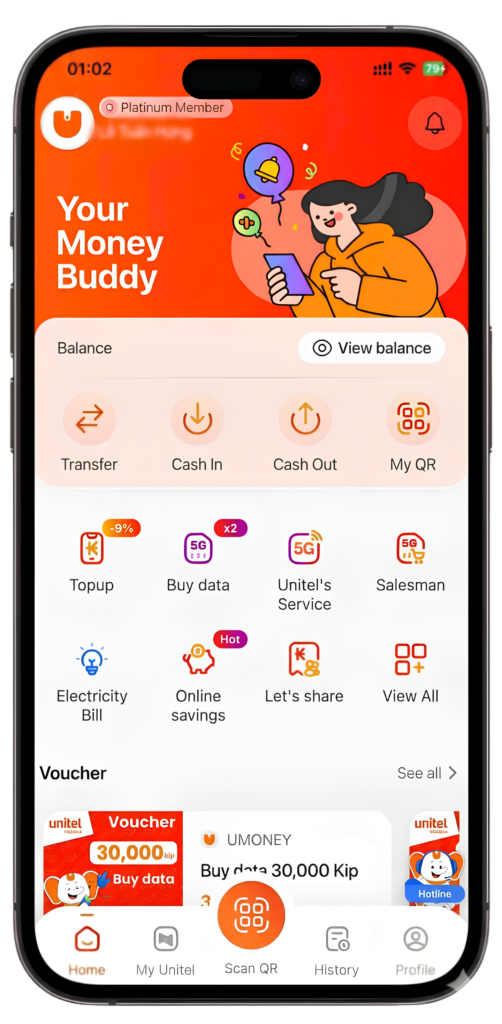
Pay your Electricity and Water Bills
Save time by paying your EDL electricity and Nampapa water invoices online with just a few taps, ensuring secure and on-time payments.
SECURE & RELIABLE TRANSACTIONS
Umoney guarantees total protection for users transactions
Register and Top up right now SUPER EASY
Access hundreds of features with free payments. Conduct transactions, make payments, and transfer funds conveniently anytime, anywhere.
- Download Umoney
- Search Umoney on App Store or CH Play and install free
- Enter your phone number and verify the OTP sent via SMS
- On the Home screen, select “Profile” and then “Profile”
- Follow the instructions – Complete your registration
- Top up easily via bank transfer or at Umoney & Unitel agent
- In Home screen, select “Cash in”, then select “Cash in at bank” for bank account or “Cash in at POS” for direct Umoney/Unitel Agent
- Set up Face ID or Fingerprint Authentication
- From your “Profile”, tap “Settings” and select “Payment Authentication Method”. Set up Face ID or Fingerprint recognition for a fast and seamless login next time.
- Receive messages in 1 second
- Receive your verification code in just 1 second via SMS.
- Instant Money Transfer
- Execute immediate interbank transfers with zero fees – Available 24/7
- Auto-Earning with Umoney
- Simply maintain a balance over 500,000 Kip and use any service to receive monthly interest
- Pay School Fees Instantly with Your Umoney
- Every payment made simple with Umoney
- Seamless Payments
- Pay anytime, anywhere with Umoney
- Home Service Special Offers
- Enjoy massive rewards on home services including FTTH, electricity, and water bill payments
- Download Umoney on App Store & Google Play
- Download Umoney now for ultimate convenience and more promotions
- Register & Verify Your Account
- Complete your KYC today to instantly receive 10,000 KIP and many other valuable rewards
EXPRIENCE AN EASY AND CONVENIENT LIFE WITH UMONEY
Download Umoney for free now
Topup
Recharge Unitel mobile credits for yourself or family members instantly and receive a permanent 5% discount along with various data bonuses.
SECURE & RELIABLE TRANSACTIONS
Umoney guarantees total protection for users transactions
Register and Top up right now SUPER EASY
Access hundreds of features with free payments. Conduct transactions, make payments, and transfer funds conveniently anytime, anywhere.
- Download Umoney
- Search Umoney on App Store or CH Play and install free
- Enter your phone number and verify the OTP sent via SMS
- On the Home screen, select “Profile” and then “Profile”
- Follow the instructions – Complete your registration
- Top up easily via bank transfer or at Umoney & Unitel agent
- In Home screen, select “Cash in”, then select “Cash in at bank” for bank account or “Cash in at POS” for direct Umoney/Unitel Agent
- Set up Face ID or Fingerprint Authentication
- From your “Profile”, tap “Settings” and select “Payment Authentication Method”. Set up Face ID or Fingerprint recognition for a fast and seamless login next time.
- Receive messages in 1 second
- Receive your verification code in just 1 second via SMS.
- Instant Money Transfer
- Execute immediate interbank transfers with zero fees – Available 24/7
- Auto-Earning with Umoney
- Simply maintain a balance over 500,000 Kip and use any service to receive monthly interest
- Pay School Fees Instantly with Your Umoney
- Every payment made simple with Umoney
- Seamless Payments
- Pay anytime, anywhere with Umoney
- Home Service Special Offers
- Enjoy massive rewards on home services including FTTH, electricity, and water bill payments
- Download Umoney on App Store & Google Play
- Download Umoney now for ultimate convenience and more promotions
- Register & Verify Your Account
- Complete your KYC today to instantly receive 10,000 KIP and many other valuable rewards
EXPRIENCE AN EASY AND CONVENIENT LIFE WITH UMONEY
Download Umoney for free now
Data Roaming
Stay connected globally by purchasing international data packages easily before or during your travels abroad, directly managed within the app.
SECURE & RELIABLE TRANSACTIONS
Umoney guarantees total protection for users transactions
Register and Top up right now SUPER EASY
Access hundreds of features with free payments. Conduct transactions, make payments, and transfer funds conveniently anytime, anywhere.
- Download Umoney
- Search Umoney on App Store or CH Play and install free
- Enter your phone number and verify the OTP sent via SMS
- On the Home screen, select “Profile” and then “Profile”
- Follow the instructions – Complete your registration
- Top up easily via bank transfer or at Umoney & Unitel agent
- In Home screen, select “Cash in”, then select “Cash in at bank” for bank account or “Cash in at POS” for direct Umoney/Unitel Agent
- Set up Face ID or Fingerprint Authentication
- From your “Profile”, tap “Settings” and select “Payment Authentication Method”. Set up Face ID or Fingerprint recognition for a fast and seamless login next time.
- Receive messages in 1 second
- Receive your verification code in just 1 second via SMS.
- Instant Money Transfer
- Execute immediate interbank transfers with zero fees – Available 24/7
- Auto-Earning with Umoney
- Simply maintain a balance over 500,000 Kip and use any service to receive monthly interest
- Pay School Fees Instantly with Your Umoney
- Every payment made simple with Umoney
- Seamless Payments
- Pay anytime, anywhere with Umoney
- Home Service Special Offers
- Enjoy massive rewards on home services including FTTH, electricity, and water bill payments
- Download Umoney on App Store & Google Play
- Download Umoney now for ultimate convenience and more promotions
- Register & Verify Your Account
- Complete your KYC today to instantly receive 10,000 KIP and many other valuable rewards
EXPRIENCE AN EASY AND CONVENIENT LIFE WITH UMONEY
Download Umoney for free now